
Spyware Basics
Bots And Botnets: The Basics
RAT (Remote Administration Tool) - IV
RAT (Remote Administration Tool) - III
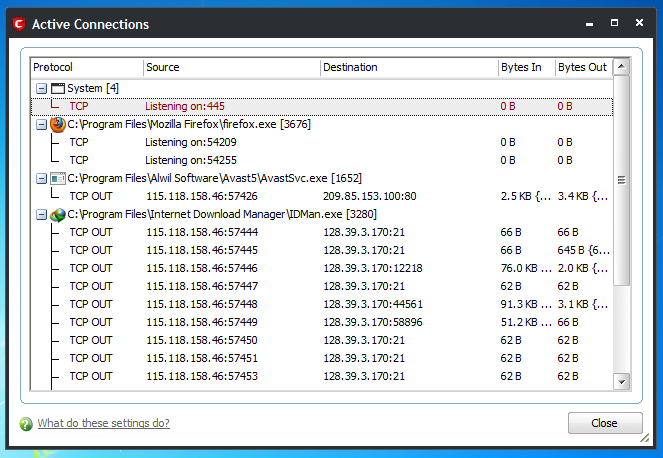

The RAT (Remote Administration Tool) - II
- Your Anti-Virus Sucks
- The attacker has created his/her own RAT client
- He had got a custom RAT client from RAT client vendor
- Applied Hex-editing on his RAT server EXE
- Attacker has used crypt or
RAT (Remote Administration Tool)


Reverse Engineering Tutorial For Newbies - II
Disclaimer - By reading or following this tutorial you agree that this tutorial is for educational purposes only.
Requirements
1.Pixtopian Book
2.OllyDBG
Method
1.First of all download Pixtopian book and install in to your computer and open the Pixtopian book.2.Now first of all we will look at the limitations of unregistered version of Pixtopian book:
a).You cannot add more than three groups and if you try to add more groups it will give the following error:
"You,ve reached the limit of three groups. Please Register Pixtopian book today!"

b)You can only add 4 Contacts/Name, If you try to add 5th name it will give the following error:
You,ve reached the limit of 4 enteries per group/ Please register PixtopianBook today!
3.Now open Pixtopian book in OllyDBG
4.Now Right click there goto search for and click on All refrence Text strings

5.Right click there and click on Search For and search for "You,ve reached the limit of three groups" once you have found it double click it
6.Scroll above and you will see the following line:
"CMP EAX.3"
This line compares how many groups you put in with 3 if the group exceeds 3 then it gives the error message which is "You,ve reached the limit of three groups" but if you don't have three groups this condition will jump to the line JL SHORT 00408B34 and this will make it jump to 00408B34

So inorder to make this esc both errors we will Change JL SHORT 00408B34 to JMP SHORT 00408B34 so this will always esc the errors and this will make not a conditional jump any more
7.Now change the value of JL SHORT 00408B34 to JMP SHORT 00408B34 and click assemble and click the blue button at the top.
8.After you click play you will end up in the following line 760642EP , The program will still not run because it has a very little range.
9.Now to increase range we will go to Options - Debugging options - Exceptions and there click on "add range of exceptions" and enter the range to "000000" and in the form "Last exceptions in range" we will enter "CCCCCCCC" Click Ok and tick also "Ignore also the following custom exceptions and ranges"

10.Now restart the program and follow again follow the steps 1-5 and again change JL SHORT 00408B34 to JMP SHORT 00408B34 start the Program and it will work and it will work for you and you can add more then 4 Groups and for adding more names repeat the above steps again.

Hint:Search For the error "You,ve reached the limit of 4 enteries per group/ Please register PixtopianBook today!"And you are done.
Basics ARP Poison routing
This paper will lay out for you the basics of an ARP Poison Routing (APR) attack and Man in the Middle (Mitm) attacks. These are very simple attacks, but can be very powerful on unsecured networks. These attacks are so easy I could provide you a walkthrough of how to do this in Cain in about one paragraph, but you wouldn’t learn anything and would become a skiddy.
Before reading this, I suggest you learn a little about networks and the OSI 7-layer model (http://www.webopedia.com/quick_ref/OSI_Layers.asp) and media access control (MAC) addresses, as these attacks take advantage of protocols that work on OSI layers other than what you are usually used to (ie, HTTP on layer 7 and TCP on layer 4, whereas ARP works on layer 2) and do not use only IP addresses for identifying computers.
Address Resolution Protocol:
The Address Resolution Protocol (ARP) is a layer 2 protocol that maps IP addresses to hardware MAC addresses. When a computer wants to find another computer on its network, it uses the ARP to identify where that computer is and how to reach it. There are 9 types of ARP packets, but only 4 are relevant here:
1. ARP – What MAC has this IP address?If you are trying to contact a computer on another network (ie, over the internet) then ARP is used to contact your border gateway and route packets to it. The gateway is then responsible for routing the packets to the desire network using IP addresses and various routing protocols instead of ARP. Once the packet has arrived at the correct network, the router that received it will then use ARP again to route the packet around the network to its final destination.
2. ARP Response – This MAC has this IP address.
3. RARP – What IP has this MAC address?
4. RARP Response – This IP has this MAC address.
The address resolution protocol works on a stateless broadcast request/single reply communication model. This means when one computer wants to know the address of another; it will broadcast a request for the address across the whole network in the form of What computer is 123.123.123.123? Tell 00:FF:AC:C5:56:3B. The computer that has the IP address of 123.123.123.123 would then send a directed reply, NOT broadcast, saying 90:F5:63:CA:BB:32 has 123.123.123.123. The MAC address in the reply is then added to the local computer’s cache, or if a mapping already exists for either the IP or MAC being used, the cache is updated to reflect this new info. The MAC/IP mapping is then used to route traffic around the network.
ARP Poison Routing (APR)
Now that you know the basics of how ARP works, let’s explore some pitfalls in the protocol. As I’ve said before, ARP is a stateless protocol. This means that each computer does not remember the state of its ARP requests/replies, and thus, does not remember if it sent a request or if it is waiting for a reply or has already received a reply to a previous request. So if we send an ARP reply, the host will accept it and alter its cache accordingly, even if the host didn’t send out a request! So if we send a reply to a target computer saying that our MAC address corresponds to the local gateway’s IP, then any traffic coming out of the target computer bound for the internet will be instead routed to your computer. You can use this to execute a DoS attack and prevent any packets from the target computer reaching the internet or you can sniff the packets for passwords and then pass them on to the real gateway.
The second method is a very effective way of getting sensitive information and is fairly undetectable unless the target is monitoring their ARP cache constantly. APR can be setup with either 1-way or 2-way poisoning. 1-way poisoning will only poison the cache of a single target and will only intercept traffic coming from that computer, as shown below:

Figure 1: 1-way APR
2-way poisoning effectively puts your computer directly between 2 target computers so that you can intercept network traffic coming from either host, as shown below:

Figure 2: 2-way APR
Some interesting attacks that can be used with APR include DoS attacks, Network sniffing/Packet stealing, and phishing.
DoS attacks can be accomplished using a 1-way poison and by redirecting traffic from a target computer to a gateway that doesn’t exist so they get ICMP Host Unreachable errors for all their network traffic, or you can redirect it to your computer and simply refuse to forward it to the proper destination. Network sniffing and packet stealing as well as Man in the Middle (Mitm) attacks require a 2-way poisoning scheme. Network sniffing and packet stealing would allow you to steal passwords and hashes that are passed over the network. With the proper filters, you can easily pick out plaintext passwords such as FTP, SMTP, HTTP form data, and hashes such as AIM and Yahoo messenger and SQL. You can even listen in on NetBios sessions and Telnet connections. With some simple phishing filters on your APR tool, you can redirect people from one website to one you control that looks the same where the victim will type in their login info unsuspectingly. This is often useful for grabbing plaintext passwords rather than having to brute force password hashes
One of the greatest hazards to be aware of when using APR is unintentional DoSing of the target or the entire network; because your computer is most likely NOT a dedicated router, and because the packets must travel all the way up the OSI model, be analyzed by your sniffer, then repackaged and sent all the way down the OSI model again, your computer can not handle packet routing as efficiently as a dedicated hardware router.
This costs a great amount of time and CPU cycles and slows down the flow of traffic that may end up backing up and DoSing the target, the network, your computer, or any combination of the three. This is a serious issue and should not be taken lightly. If you APR a router on a large network, you may have hundreds of thousands of packets going thru your computer each second. Another hazard that is of interest to hackers is the fact that proxies cannot effectively be used, because ARP and APR works on layer 2 and proxies work on either layer 5 or 7 (depending on the amount of anonymity used) and usually require traveling outside the network to a proxy server. This may seem like a huge safety issue for a hacker, but there is hope! While IP addresses are difficult to spoof over the internet while keeping traffic flowing to and from your computer, both the IP address and MAC address can be effectively altered on a LAN. Many tools exist for changing your MAC and IP during APR attacks. Cain provides an option to do this under the “Configure” menu item.
Man In The Middle (Mitm) Attacks
Mitm attacks include a range of possible attacks, from DoSing, to sniffing, phishing, and rerouting for SE purposes. Mitm is started with a 2-way APR attack that in effect inserts your computer between 2 targets (often a host and a gateway). You can then begin the real meat of the mitm by using customized programs and packet filters to gain the effect you need.
For a simple sniffing attack, a network sniffer such as Ethereal with an IP or MAC filter applied to only capture packets to or from the target is sufficient. For more advanced attacks like password grabbing and phishing, you need more advanced filters. In the case of grabbing passwords, you need to have a filter that disassembles the packet to get to the layer 4 data and above, then scan that data for plaintext passwords or hashes such as HTTP POST or GET data, FTP, SMTP, or SQL login info, or you can use a filter to capture an entire NetBios, Telnet, or VoIP session to record conversations and gather potentially sensitive information. Sometimes it is not always desirable to have a password hash, especially when you can get the plaintext password in less time. This is where phishing comes in. Phishing is the art of constructing a website to look exactly like another, then redirecting traffic from the real site to the one you control in the hopes that no one will notice and will happily type in their real login info, assuming that everything is as it should be. Great care should be taken in conducting a phishing style attack, and I will offer some pointers and methods later on.
Because mitm attacks are built on the back of an APR attack, then all the limitations of an APR attack also apply to a mitm attack. But with the increased complexity of a mitm attack, you must also be aware of further limitations. Using complex filters or packet scanners consumes a lot of CPU cycles and can further increase the risk of unintentional DoSing or breaking of the network. Phishing should be used with care as well, because even the smallest difference between your site and the legitimate one will be noticed by daily users and may raise suspicion.
Phishing
Phishing, as already stated, is making a fake site to fool people into giving you their plaintext passwords and login info. There are several methods for creating a phishing site (phishing lure :D). You can attempt to create your copy site from scratch and code it yourself, but chances are people who use the site regularly would know the difference. Another way would be to copy the source code, images (keeping the directory structure in tact), and any stylesheets, javascripts, or embedded objects, then just make a few small changes to the code. Make sure to change all relative directories to absolute URLs when you do this! If you don’t, a form may not direct to the right page or produce a 404 error or an image may not display right and will raise suspicion. This method produces a site that looks and behaves nearly identically to the original, but because it is still being hosted on another server under a different domain name, observant users may spot the anomaly and report it. For low profile targets, this method is fast and effective.
The final method I will discuss is how to do it without making a fake site at all. Because you are executing a mitm attack and have full access to every packet that moves to and from the target, you can create a packet filter that will change the ACTION property of a tag, so that when the victim clicks the login button, the data will be sent to a site of your choice where you can log the information. This method may be slightly easier to execute, but it will increase the risk of unintentional DoSing due to the processing power required for the filter.
No matter what method you choose to use, it is almost always a good idea to take the login info that you received from your fake site and pass it on to the real site to log the user on. This makes your attack more hidden and more difficult to detect. When doing this, make sure to catch errors coming back from the real site in case the user entered an invalid password or username. Then pass this information back to the user. This can be done easily and is no big deal to implement, but failing to do so may raise suspicion and may get you caught.
APR with Cain
Most people think of Cain as a simple password hash cracker, but it is actually much more. It is a very powerful network analyzer and password recovery tool as well as a cracker. It can dump protected storages, sniff network connections, enumerate hosts and users as well as network shares, and can even remotely install the backdoor program Abel. Now, on to the good stuff! I will show you a basic password sniffing mitm attack, but first, I assume you have Cain configured properly for your network card. If not, click the “Configure” menu option and read the help files.
Start up Cain and look at the icons in along the top, just under the menu. The 2 icons we will be concerned with here are the nuclear symbol (the APR icon) and the small circuit board with a red arrow (the sniffer icon). If you are not sure which icons I am talking about, hover your mouse over them and find the icons for “Start/Stop Sniffer” and “Start/Stop APR”. Click the sniffer icon to start the sniffer. Now go to the sniffer tab. The table shown in this tab provides you with information about computers currently on your network and should be blank. If not, clear it by right clicking and selecting “remove all”. The most useful columns right now are the first 4: IP Address, MAC Address, OUI Fingerprint, and Host Name.
These should be pretty self explanatory with the exception of the OUI Fingerprint column. When a MAC address is coded into a piece of network hardware, part of the address is used to define the particular computer (like a serial number) and part is used to define the vendor that makes the hardware. Cain has a database of vendors that it checks the MAC address against to discover who made the hardware of that particular host. This is what is contained in the OUI Fingerprint column.
Once the sniffer is started, we need to populate the sniffer tab with host info. Click the “+” button to gather a list of all computers on the current network. If you have Ethereal, you can start that up with “arp” in the filter and watch Cain send out consecutive ARP requests for every IP in your subdomain and watch all the computers respond, freely giving away information about themselves. Once we have a list of possible targets, we need to setup an APR attack. Click on the “Start/Stop APR” icon to start the APR poisoner, then click the “APR” tab at the bottom of the “Sniffer” tab window. There are 2 tables in this tab: the top one is hosts on the LAN that you can directly affect, the bottom table is for computers on the WAN, which, depending on the border router’s settings, may or may not be vulnerable to APR. This list is populated as hosts are discovered thru analyzing packets.
Select the LAN table, and click the “+” icon again. Now select 2 hosts to insert yourself between. After that’s done, sit back and watch the packets roll in. Check the “Passwords” tab on the bottom for various passwords, or the branches under the “APR” symbol on the main APR tab to get HTTPS certificates and other valuable information. The APR-DNS branch can be used in phishing and in redirecting traffic from a website. Well, that’s it. That’s all there is to spying on people’s network traffic when you have access to a computer on the network, which is quite often if you go war-driving behind main street, picking up all the “insekure” business wi-fis
Conclusions
On large or sensitive networks, APR and Mitm can be a very effective way of getting valuable information thru many means, including packet filters and sniffers, phishing, and traffic rerouting. Some of the overall limitations of ARP poisoning are that it cannot cross routers unless they are set up as a single autonomous unit (AU) and are contained in the same subnet. ARP poisoning can be easily thwarted if static caches are being used. Static caches prevent host caches from being updated remotely via the ARP protocol. Some of the interesting things I have actually been able to get from APR and Mitm include:
- Webmail and SMTP loginsThings I’ve learned from my exploits: SECURE YOUR Network! And DON’T do important things on a public network (library, school). You never know when Big Brother is watching
- FTP logins to servers running FTPD as root (w00t!)
- FTP logins to websites (pwnt)
- Admin logins to sites
- Student and teacher account logins to my college (I can change their schedules for next year :D)
- AIM convos/hashes and Telnet/SMB/SSH sessions
- Wardriving behind businesses to take over their networks
- Online banking login info and certificates (free moneys!)
Links, References, and Tools
- Cain
- Ettercap
- Ethereal
- ARPoison
- Dsniff
- Parasite
- WinARPSpoofer
- http://en.wikipedia.org/wiki/ARP_spoofing
- http://www.grc.com/nat/arp.htm
Exploiting Basics
PHP and Perl attacks are run on the persons computer through an interpreter - a program that reads the code and runs the output. These are usually powered by an underlying SQL or XSS attack.
The other type of attack is a plain web based attack, usually a SQL injection or an XSS exploit with no PHP or Perl powered frontend. These are the easiest to do, but the hardest to figure out how to use as there is not a definitive way of executing them.
General Information
Operating Systems
The most widely used OS is Windows and to be honest I hate it. But I use it. But it is very hard to hack with as tools are not really created for it in mind. Because of that I recommend Linux as a hacking OS because everything just works. .
Oh, yeah, did I mention its free?
PHP
PHP (PHP: Hypertext Preprocessor) is a computer scripting language, originally designed for producing dynamic web pages. It is mainly used in server-side scripting, but can be used from a command line interface or in standalone graphical applications.
Yes, that's from Wikipedia. But its helpful and might be interesting.
But PHP is a very useful and powerful programming language which is used for diverse projects. Because its powerful yet simplistic its used for hacking. And, of course, its free.
How To Spot a PHP Exploit
A PHP exploit is always encased in tags.
Perl
Perl is a dynamic programming language created by Larry Wall and first released in 1987. Perl borrows features from a variety of other languages including C, shell scripting (sh), AWK, sed and Lisp. Perl was widely adopted for its strengths in text processing and lack of the arbitrary limitations of many scripting languages at the time.
Yes, thats from Wikipedia too. But Perl too is a powerful yet simplistic language, like PHP. And its free as well
How To Spot a Perl Exploit
They always start with
#!/usr/bin/perl
Executing Exploits:
Web Based:
These attacks differ hugely so the easiest thing to do is to read the NFO when using this kind of attack.
They usually come in the format
http://www.xxx.org/view.php?id=-1+union+select+1,2,3,convert(concat(database(),char(58),user(),char(58),version()),char),5,6,7,8,9,10,11,12/*
The example is a SQL injection but XSS attacks looks very similar. All text after the view.php? is the sploit. The exploit occurs in the way that the PHP handles the information being sent by the HTML.
To use these you just paste everything from http://www.xxx.org/ into the browser address bar while on the vulnerable page of the website.
For example: I am on the forums of a website at www.somewebsite.org/forums/. I know the exploit is in the format above. But, I know that the venerable part of the site is in the /forums/ sub directory so I paste the exploit there:
www.somewebsite.org/forums/view.php?id=-1+union+select+1,2,3,convert(concat(database(),char(58),user(),char(58),version()),char),5,6,7,8,9,10,11,12/*
You can take this principle and apply it to XSS exploits as well.
To be a script you do not need to know SQL, but if you want to develop your own exploits it helps a great deal. Look here for more information: http://www.w3schools.com/sql/default.asp
PHP on Windows:
To run PHP on Windows, you need the PHP software. The is open source so free to download.
http://www.php.net/downloads.php
Download the latest version of the Windows binary installer and the zipped folder.
Run the installer, install it into C:PHP, choose not to configure a web server. Next, open the zip, extract everything into the same folder. Rename php.exe to php2.exe or php.exe.bak. Now copy the php.exe from the C:PHPCLI folder to C:PHP.
Right-click My Computer and pick properties. Click the Advanced tab, then the Environment Variables at the bottom. In the second list-box youâ??ll see a line for PATH. Double-click it and add to the end of the existing line â??;C:PHPâ?? This should give you something like:
Code:
C:WINDOWSsystem32;C:WINDOWS;C:WINDOWSSystem32Wbem;
C:Program FilesCommand;C:PHP
Click OK.
Now open a Command Prompt and type the following lines:
ASSOC .php=PHPScript
FTYPE PHPScript="C:PHPPHP.EXE" "%1" %*
You can now just type a PHP script name to run it like an EXE in Command Prompt. No need to type PHP first. For example:
Code:
C:>phpscript.php
Now you have got PHP environment set up save the exploit to your computer as a .php file. The easiest way to do this is to paste everything from the into notepad. Then File -> Save as and save as type All Files. then in the file name type exploit.php.
Read through the php file before running as often you need to define (change) the variables which are used throughout the exploit, such as the website name. These are always at the top of the program and look like:
$target = 'http://localhost/cutenews.1.4.5/search.php';
$username = 'waraxe'; // Username is needed
$outfile = './cute_log.txt';// Log file
The text after the // are comments (apart from the web address). This is so the programmer can give you information about what to do within the source code. Always read these as they give useful information.
Change the text within the '....' to the information relevant to the site that you are exploiting.
Finally you can run it on the command prompt but navigating to the directory that you saved the exploit.php file in.
C:> cd C:/your/dir/goes/here
and then run the exploit
C:/your/dir/goes/here> exploit.php
The output of your exploit, such as passwords, will be shown in the command prompt.
Your done
PHP on Linux (Debian/Ubuntu):
Firstly, become root. Then install PHP.
apt-get install php5
Then save the exploit as exploit.php to your home directory. The exploit is everything within .
Read through the php file before running as often you need to define (change) the variables which are used throughout the exploit, such as the website name. These are always at the top of the program and look like:
$target = 'http://localhost/cutenews.1.4.5/search.php';
$username = 'waraxe'; // Username is needed
$outfile = './cute_log.txt';// Log file
The text after the // are comments (apart from the web address). This is so the programmer can give you information about what to do within the source code. Always read these as they give useful information.
Change the text within the '....' to the information relevant to the site that you are exploiting.
Finally, run the php file.
php exploit.php
The output of your exploit, such as passwords, will be shown in the command prompt.
Your done
Perl on Windows:
Perl is very similar to PHP in the way that its run, but thanks to good software, it is a lot easier to execute.
Download Strawberry Perl from: http://strawberryperl.com/
Just install and you are able to run perl files by executing on the command line
perl exploit.pl
Read through the perl file before running as often you need to define (change) the variables which are used throughout the exploit, such as the website name. These are always at the top of the program and look like:
$target = "http://localhost/cutenews.1.4.5/search.php";
$username = "waraxe"; #Username is needed
$outfile = "./cute_log.txt2; # Log file
The text after the # are comments (apart from the web address). This is so the programmer can give you information about what to do within the source code. Always read these as they give useful information.
Change the text within the "...." to the information relevant to the site that you are exploiting.
Finally run the exploit by typing into the command line:
perl exploit.pl
The output of your exploit, such as passwords, will be shown in the command prompt below.
Your done
Perl on Linux (Debian/Ubuntu):
Become root and install perl:
apt-get install perl
You are then able to run perl files by executing:
perl exploit.pl
Save the perl exploit to your home directory as exploit.pl.
Read through the perl file before running as often you need to define (change) the variables which are used throughout the exploit, such as the website name. These are always at the top of the program and look like:
Code:
$target = "http://localhost/cutenews.1.4.5/search.php";
$username = "waraxe"; #Username is needed
$outfile = "./cute_log.txt2; # Log file
The text after the # are comments (apart from the web address). This is so the programmer can give you information about what to do within the source code. Always read these as they give useful information.
Change the text within the "...." to the information relevant to the site that you are exploiting.
Finally run the exploit by typing:
perl exploit.pl
The output of your exploit, such as passwords, will be shown in the command prompt below.
Find the Person Behind the Email Address
You get an email from a person with whom you have never interacted before and therefore, before you reply to that message, you would like to know something more about him or her. How do you do this without directly asking the other person?
Web search engines are obviously the most popular place for performing reverse email lookups but if the person you’re trying to research doesn’t have a website or has never interacted with his email address on public forums before, Google will probably be of little help.
No worries, here are few tips and online services that may still help you uncover the identity of that unknown email sender.
#1. Find the sender’s location
Open the header of the email message and look for lines that say “Received: from” followed by an IP address in square brackets. If there are multiple entries, use the IP address mentioned in the last entry.
Now paste the IP address in this trace route tool and you should get a fairly good idea about the location of the email sender.
#2. Reverse email search with Facebook
Facebook has 450 million users worldwide and there’s a high probability that the sender may also have a profile on Facebook.
Unlike LinkedIn and most other social networks, Facebook lets you search users by email address so that should make your job simpler. Just paste the email address of the sender into the Facebook search box and you’ll immediately know if a matching profile exists in the network.
If you are able to locate that person on Facebook, download his profile picture and then upload it to TinEye – it’s a reverse image search engine so you can locate his other social profiles where he may have used the same picture.
#3. Check all the other Social Networks
You can use a service like Knowem to quickly determine if a profile with a particular username exists in any of the social networks.
If the email address of the send is something like green_peas@hotmail.com, there’s a probably that he or she may have created accounts of some other social network using the same alias “green_peas” – put that in knowem.com to confirm.
#4. People Search
Finally, if nothing works, you should try a people search service like Pipl and Spokeo – both services let you perform reverse email lookups but Spokeo has a more comprehensive database than Pipl.
Other than regular web documents, Spoke also scans social networks and even the whois information of domain names to find any bit of information associated with an email address. However, some of the results returned by Spokeo are only available to subscribers.


Career Academy – Hacking, Penetration Testing and Countermeasures Training – Module 1 & 2

Security 101
Hacking Hall of Fame
What are Today’s hackers Like?
Today’s Hackers
Risk Management
Evolution of Threats
Typical Vulnerability Life Cycle
What is Ethical Hacking?
Rise of the Ethical Hacker
Types of Security Test
Penetration Test (Pen-test)
Red Teams
Testing Methodology
VMWare Workstation
Windows and Linux Running VMWare
Linux Is a Must
Linux Survival Skills
Useful vi Editor Commands
Module 1 Review
Desired Information
Find Information by the Target (Edgar)
terraserver.microsoft.com
Network Reconnaissance & DNS Search
Query Whois Databases
Command-Line Whois Searches
ARIN whois: Search IP Address Blocks
SamSpade Tool and Website
Internet Presence
Look Through Source Code
Mirror Website
Find Specific Types of Systems
Big Brother
AltaVista
Specific Data Being Available?
Anonymizers
Countermeasures to Information Leakage
Social Engineering
DNS Zone Transfer
Nslookup command-line utility
Zone Transfer from Linux
Automated Zone Transfers
Zone Transfer Countermeasures
CheckDNS.net
Tracing Out a Network Path
tracert Output
Free Tools
Paratrace
War Dialing for Hanging Modems
Manual and Automated War Dialing
Case Study
guidedogs.com
Footprinting Countermeasures
Demo – Footprinting & Info Gathering
Download-Hotfile
http://hotfile.com/dl/92740859/738b0b2/07-041-12-2k10.part1.rar.html
http://hotfile.com/dl/92741044/fe11bbd/07-041-12-2k10.part2.rar.html
http://hotfile.com/dl/92741247/5a709e8/07-041-12-2k10.part3.rar.html
http://hotfile.com/dl/92741258/b127a95/07-041-12-2k10.part4.rar.html
Download-Uploading
http://uploading.com/files/332899d2/07-041-12-2k10.part1.rar/
http://uploading.com/files/b91d6333/07-041-12-2k10.part2.rar/
http://uploading.com/files/f4c7b26d/07-041-12-2k10.part3.rar/
http://uploading.com/files/b6171414/07-041-12-2k10.part4.rar/
Download-Filesonic
http://www.filesonic.com/file/49124230/07-041-12-2k10.part1.rar
http://www.filesonic.com/file/49124238/07-041-12-2k10.part2.rar
http://www.filesonic.com/file/49124198/07-041-12-2k10.part3.rar
http://www.filesonic.com/file/49123852/07-041-12-2k10.part4.rar
Download-Fileserve
http://www.fileserve.com/file/VzqbejS
http://www.fileserve.com/file/ygah38u
http://www.fileserve.com/file/QAHSKNs
http://www.fileserve.com/file/h9aWn3t


