
Showing posts with label RAT. Show all posts
Showing posts with label RAT. Show all posts
RAT (Remote Administration Tool) - IV
Prevention Against A RAT Attack
Now we are to the last part of RAT Remote Access Tool. Up till now we have covered how a RAT is created, how attackers manage to hide presence of RAT in victim's PC and how we can manually detect and take action against presence of RAT if our Anti-Virus Program or Security suite fails to detect it. Now in this part we'll learn how we can prevent ourselves from getting caught by a RAT attack.
As told in RAT- II attacker does some process to hide detection of RAT from Anti-Virus program but you are not fool to click on any suspected file unnecessarily. So most of the time an attacker uses Trojan vector to execute his RAT server on victim. There can be many method an attacker can use to hide his malicious code in some kinda media that can transfer it to victim, such media is known as vector. A vector is responsible for spreading of viruses worms and RATs.
A vector may be a simple image file, executable file, media file or even a website. So now lets have our look on each one by one.
Vector Image File: As stated earlier a RAT file might be very very small in size of 100kbs-200kbs only. But as we are now prone to high definition image files only whose resolution usually remains above 1800x1600 with possible better color depth making it 1MB – 3MB in size. They can store 100-200kbs information in them very easily. If an attacker want to execute RAT from vector image it appends RAT to end of Image file thus when you click on image, image opens without any problem but also invokes appended executable ultimately infecting victim's computer. The appending is usually done via a software providing binary addition of files without change in their integrity. Now what is binary addition method to add files and how it works is beyond scope of this post. Now this kinda images are distributed by attackers using torrents and by spamming. Have you ever found an e-mail in your inbox with “Nude Pics Of Aishwarya Rai For Free(HD)”, “Katrina Kaif Nude Pics Revealed(HD)”. Now fact number one any how you always know that pics does not really exists and fact number two even if it exist then they are fake pics created using Photo editing tools like Adobe Photoshop or Gimp. Then why to make yourself eager unnecessarily. Keep yourself away from such things, these are tricks by attackers to download those high quality fake images in which they have hidden their dirty stuff.
Executable File: Many RAT clients by default offer you adding a legitimate executable file with their server code so that once the victim runs legitimate file he/she gets infected. These files are usually spread using torrents and Dark Warez sites. Dark Warez sites are those where a software is provided with its key-gen or crack executable, they are also known as pirate sites. Attackers usually bind their files in keygens and crack executable s, I think I don't need to mention this, because if you have ever downloaded any file from such kinda site your anti-Virus might have got in form. Most people disable Anti-Virus thinking its false alarm but Anti-Virus makers are not fools to give you a false alarm on every such file downloaded from Dark Warez site. They are actually malicious and hence we find most of our college computers are always infected with malware.
Media: Media files like audio and video both can contain malcious code and wrapping against them a RAT file can never get detected since we hardly find any reduction and compromise in quality of media. People who always stay online for movies and music usually become prey to such infected media files. A better defense is always keep your media players and flash player to newest version.
Websites: Now a days many web technologies allow a web page to execute Active X contents on the visitor's PC via browser. Browsers are per-configured to run scripts and scripting languages responsible
for execution of these Active X elements. Sites which support Java drive by and flash scripts are more likely to put you in trouble. That's the reason why most of the time I advise to avoid flash contents on your blog because they can be exploited very easily. To avoid getting infected from websites which run malicious codes on your PC always keep your eyes on notification and keep pop-up blocker on and use some good Internet security suite.
RAT (Remote Administration Tool) - III
Counter And Defense Against RAT Attack
Welcome to the third part of The RAT tutorial and I am extremely sorry you have to wait a little more so see this article coming up. By the way in this section we ll make ourselves aware how we can counter and create a defense against RAT attack. Dear visitor if you are reading this post without reading its previous parts then I urge you to please read,
before you read this.
So as seen before RAT may use any unknown port to communicate with attacker and the best defense against any process communicating using unknown port is firewall. There are various commercial firewalls available but here are few good free firewalls that can even lead a commercial firewall bow down to its feet. Following are few good free firewall programs on basis of their ranking by customers,
1.Online Armour
2.Zone Alarm
3.Comodo Firewall
4.Private Firewall
People consider Online Armour as one of the toughest free firewall available, by the way I prefer Comodo Firewall. Comodo firewall also shows you process which are communicating, port numbers via which they are communicating and full path of process invoking executable file, here's a view of how Comodo shows you process.
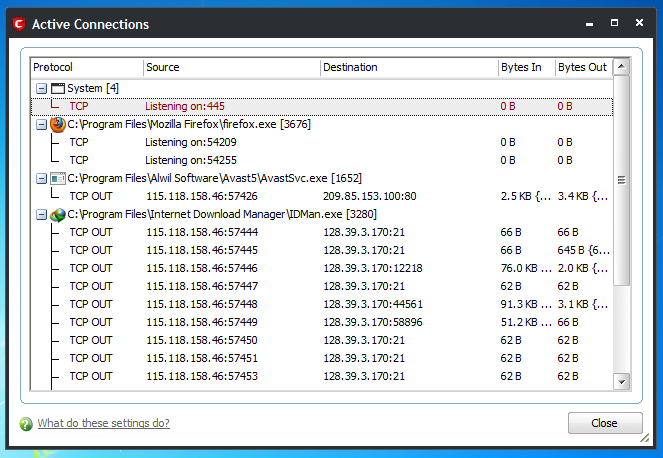
Now as we discussed in RAT - II a RAT becomes fully undetectable if he/she applies any process discussed in previous RAT post. That means if your anti-virus fails to detect it, following can be symptoms that can appear on your system which can help you identify its presence,
1.Disable Of Task Manager and Disable Of Folder Option
2.Sudden Opening And Closing Of CD/DVD-ROM
3.Blue Screen Of Death or Just Blue Screen
4.High Bandwidth Consumption
5.Sudden Open Of Web Pages
6.Pop Ups
7.Change Of Wallpaper
8.Disappear Of Mouse Arrow, Start Button and Task Manager
If you find any of the above things happening on your PC its time to manually check your system for RAT. But as I told you before RAT server may hide in known processes or may even use only known ports to communicate with attacker so detection would not be easy. Here we'll learn step by step approach how you can manually detect its presence.
As told earlier a RAT can hide it self in process space of another process like explorer.exe, iexplorer.exe, scvhost.exe, services.exe. Open your firewall and check out if explorer.exe or services.exe are communicating with remote host. If yes then you are infected because these processes never communicate with any remote host. Now the process that communicate are svchost.exe and iexplorer.exe.
To find out whether iexplorer.exe is communicating with remote host as client to installed RAT server close Internet Explorer, wait for 5-6 seconds and see if its communicating then you are infected. Now if attacker has configured to close connection as soon as Internet Explorer(IE) closes you will not be able to detect its presence in firewall, in this case you have to keep yourself prepared by watching how much memory IE takes while opening www.google.com leave IE like that and open “Task Manager” by typing taskmgr.exe in RUN window. Keep your eye on memory consumption(not CPU consumption) of IE if it fluctuates even after 1 minute then you can be sure you are 100% infected.
What if attacker decides to hide process in scvhost.exe? In this case open firewall and watch for ports with which svchost.exe is communicating. Make sure port numbers should be 53 or 443 on remote host in listening mode only, if not then you are infected. Now if attacker has planted port number 53 or 443 in RAT for communication with svchost.exe then how you gonna detect. Now here you'll need a little technical brain, a scvhost.exe process runs in three modes,
System Mode: Which never communicates with internet
Local Mode: Which never communicates with internet
Network Mode: Which communicates with internet.
All three modes run as different processes with different process IDs. Now the Network Mode scvhost.exe runs as network service, so open taskmgr.exe and locate scvhost.exe where username is Network Service now note process ID, disconnect from network and wait for 1-5 minute monitoring that process memory consumption. You have to wait for 5 minutes just because even after disconnecting scvhost.exe does not settle down network and hence memory usage appears fluctuating for long time. Once memory usage becomes stable then wait for sometime and monitor it for memory usage fluctuation, it should not be above 2 MBs.
Now above were manual method to identify presence of RAT in your system if your Anti-Virus and even malware detection software fails to detect RAT. So far as my view is concerned Norton, Avast Professional, Avira and AVG professional are best Security Suites available to tackle all kind of software based threats and malware. And if you use your system for critical purposes then you are the fellow who is in very much need of “Black Ice Defender”. It is awesome piece of code written specially to avoid any kind of intrusion on your system.

The RAT (Remote Administration Tool) - II
Why RAT's Don't Get Detected
So we are back to the second part of The RAT Remote Administration Tool. In this section we will learn how an attacker manages to hide a RAT in victim's computer, if you are new visitor or you haven't read the first part I urge you to please go through previous post on The RAT before you read this.
Before we proceed I want to tell you there's no RAT tool available whose server can not get detected by an Anti-Virus program. At practical level every Anti-Virus program can detect RAT developed by all possible free as well as commercially available RAT developing tools. Then how an attacker manages to implement an attack on you. Following may be the reasons, why you may become victim to his/his attack,
- Your Anti-Virus Sucks
- The attacker has created his/her own RAT client
- He had got a custom RAT client from RAT client vendor
- Applied Hex-editing on his RAT server EXE
- Attacker has used crypt or
As I always tell you hacking evolves by fractions of minutes to fractions of seconds, RAT clients also gets updated and hence your Anti-Virus too needs to be updated. If you don't update it means you are inviting more and more troubles than just RAT, always update your Anti-Virus programs or let its auto-update option enabled. In any other case than this if your Anti-Virus fails to detect RAT it means it is total crap UN-install it and use some another Anti-Virus program.
The second case is the attacker is master programmer and he/she has used his/her master programmer skill to develop a new custom RAT client. Since the code is new, no Anti-Virus will have its definition ultimately making it Fully UN-Detectable (FUD). It is really very hard to keep yourself safe from such kinda RAT since it is hard to detect before damage is done.
Some vendors also offer custom RAT clients for special price, again due to its code being new any Anti-Virus program will hardly have its definition and hence even this works. Next is hex-editing, it is one of the most difficult thing to do for changing signature of the RAT server(our virus) file. So far as I know it is really very difficult and attacker must be having powerful hand over understanding different number systems and machine level codes, also it is very time consuming process. If you want to know how it is done then Rahul Tyagi has offered a pro tutorial on his blog www.salienthacker.in on hex-editing.
Last is one of the most easiest methods and due to which a VIRUS code becomes Fully Undetectable. The use of crypt-or software avoids the job of recoding and hex-editing and mutates the signature of virus file in such a way that it works fine but its code generates different signature which is not anyhow matches the previous signature, thus making is undetectable.
Other factor that leads to hide RAT in your system is process space sharing. In this the RAT server file shares process space of system processes or well known process like,
explorer.exe
svchost.exe
services.exe
And the last factor that let them do their job is port number. Many RAT clients will use regularly used port numbers to establish connections like HTTP port 80, HTTP proxy port 8080, FTP port 21 and uses any kinda connection may it be TCP or UDP.
So above are some reasons why a RAT server doesn't get detected when all codes are available to Anti-Virus vendors. So the next time we meet we'll discus how you can prevent yourself from a RAT attack.
RAT (Remote Administration Tool)
In this post we will learn how to create Remote Administration Tool(RAT). But before we proceed let's discus some basic terminologies.
Trojan: Trojan horse or Trojan is a malware that appears to perform a desirable function for the user prior to run or install but instead facilitates unauthorized access of the user's computer system. It is harmful software/code that appears legitimate. They come packed with some other piece of code or software and hence users get tricked to run them. The term Trojan has been derived from the Trojan Horse from Greek Mythology.
Types Of Trojan:
1.Remote Access Tool (RAT)
2.Proxy
3.File Sending Trojan
4.Security Disable rs
5.Denial Of Service (DOS)
6.File Sending Trojans(FTP Trojan)
7.Destructive Trojans
Remote Access Tool(RAT): Remote Administration Tool also known as RAT is used to remotely connect and manage single or multiple computers. RAT is one of the most dangerous Trojan because it compromises features of all types of Trojans. It provides an attacker with nearly unlimited access to host computer along with Screen Capture, File management, shell control and device drivers control. RATs uses reverse connections to connect remote system and hence are more likely to remain undetected. They can hide themselves in process space of legitimate program and hence never appear in task manager or system monitors.
A Trojan generally has two parts Client and Server or Master and Slave. We can say Server is Slave and Client is Master. So a server side is installed on a remote host and the attacker manipulates it with client software. In olden days making a Trojan was a job of master programmer but now a days several Trojan building tools are available. Most of them usually have same kinda interface so its quite easy to use any Trojan client once you have used any one of them . Following is list of some well known Trojans and Trojan Building Tools,
1.Casa RAT
2.Back Orifice
3.Bandook RAT
4.Dark Comet Rat
5.Cerberus
6.Cybergate
7.Blackshades
8.Poison Ivy
10.Syndrome RAT
11.Team Viewer
12.Y3k RAT
13.Snoopy
15.5p00f3r.N$ RAT
16.NetBus
17.SpyNet
18.P. Storrie RAT
19.Turkojan Gold
20.Bifrost
21.Lost Door
22.Beast
23.Shark
24.Sub7
25.Pain RAT
26.xHacker Pro RAT
27.Seed RAT
28.Optix Pro RAT
29.Dark Moon
30.NetDevil
31.Deeper RAT
32.MiniMo RAT
If you think the list is very big then I must tell you it's not complete nor it covered 25% of RAT building tools.
Demonstration: How to create a RAT:Since there are several tools available and most of them have same kinda interface we can select any RAT building tool for demonstration. So here we select Cerberus Client to demonstrate working of RAT. Please note that using RAT for hacking is crime please take this demonstration for educational purpose only.
Type “Download Cerberus RAT” in Google search and download Cerberus RAT. Execute Cerberus file and launch program. Accept EULA and following interface will be launched in front of you.

To create server press new button.

As you can see there are several options are available in settings but for our demonstration we will use most common settings. In “Basic Option” type your IP address and then press “+”. In identification name of the server from which your client will identify to which server it's listening, this name is given for your client to identify connection. No need to specify what to put in connection password. Specify the port on which you'll like to listen. Please keep note of this port since you'll have to configure client settings to receive information on this port.

The next option is “Server Installation”. From “Directory Installation” you can select where and in which name folder your RAT server will be installed. In “File Name” option you have to specify name and extension of your server. Boot Methods gives you option to start your server as “System Service” or “User Application” take your pick or leave them untouched. “Anti-Debugging” function allows your RAT to bypass Virtualisation and Sandboxing.
From “Misc Options” you can activate key logging feature as well as you can select how your RAT can hide itself in another process.
“Display Message” option gives you power to show custom message on victim's computer.
“Black List Item” option allows to set logic for execution of your RAT server with respect to specific process and service. Mostly only advanced users use this feature.
“Overview” allows you look of features of your RAT. Now select an icon and press create server to create server.
Now the add file function allows you to bind your RAT with any legitimate file most probable is an executable installation file. To avoid detection don't use custom message box and UN-check “Run in Visible Mode” option while creating server.

Configuring To Listen On Client: To configure Cerberus to listen on specific port select options and put “Connection Password” and “Connection Ports” that were specified in Server. Wait for victim to execute server and then just right click on listening server and play with options.

Following is video demonstration to above procedures and methods described to create RAT using Cerberus Client.
Now when next time we will discus RAT we will take a look on how you can counter and prevent yourself from RAT attack. Please give us your comments it'll help us improve. Have a nice time and keep visiting.

